
How to Keep Cloudflare From Blocking Google and AI Crawlers
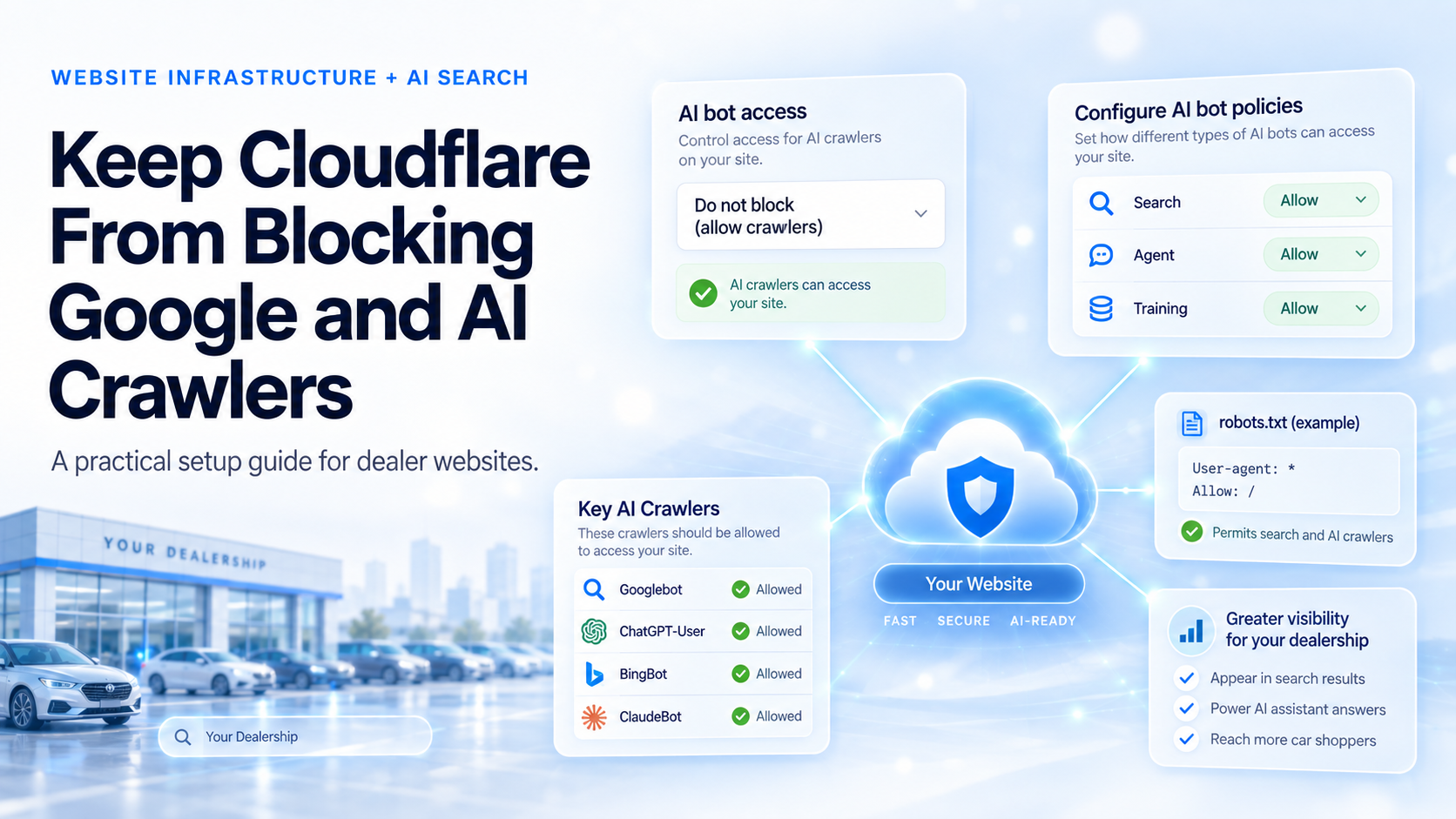
A dealership website can have strong content, accurate inventory and clean structured data and still be difficult for search and AI systems to use if the security layer in front of the site blocks their crawlers. Cloudflare has now made that easier to manage.
On September 15, 2026, Cloudflare changed its AI crawler controls and introduced a new Disallow AI Training option. The new system separates three types of crawler activity: Search, Agent and Training. It also introduces Bot Preference Sync, which can keep the site's robots.txt instructions aligned with the crawler policies selected in Cloudflare.
For dealer websites, the important change is that it is now possible to allow search crawling while separately opting out of AI model training.
Why crawler access matters to a dealership
Search engines and AI services use automated crawlers to find and retrieve information from websites. Googlebot needs to reach your pages for Google Search to index them. AI systems also use crawlers to find information for search results, answer shopper questions or retrieve a page when someone asks about a business.
For a dealership, that can include information such as:
- new and used inventory
- service and parts information
- dealership hours and location
- model information
- FAQs
- financing information
- local buying guides
If Cloudflare blocks a crawler before it ever reaches the website, improvements to page content or structured data cannot solve the problem. The challenge is that not every bot does the same job.
Cloudflare now separates Search, Agent and Training
Cloudflare divides AI-related crawler activity into three categories:
| Category | What it means |
|---|---|
| Search | Crawlers that collect or index content so it can later appear in search results |
| Agent | Automated systems that visit a page in real time on behalf of a user, such as an AI assistant retrieving information |
| Training | Crawlers that collect content to train or fine-tune AI models |
One crawler can perform more than one of these jobs. Cloudflare calls these mixed-use crawlers. Cloudflare classifies Googlebot, Applebot and Bingbot as mixed-use crawlers because the same crawler can be used for both Search and Training.
That distinction matters because Cloudflare's Block setting now applies to mixed-use crawlers too. If you set Training to Block, Cloudflare says mixed-use crawlers including Googlebot, Bingbot and Applebot can be blocked completely. That means blocking Training can also interfere with traditional search crawling.
Cloudflare's new Disallow AI Training setting is designed to avoid that problem.
The important difference: Block vs. Disallow AI Training
These settings may sound similar, but they behave very differently.
| Training setting | What happens |
|---|---|
| Allow | Training crawlers are allowed unless another Cloudflare or WAF rule blocks them |
| Disallow AI Training | Cloudflare publishes a no-training preference for supported mixed-use crawlers so they can continue crawling for search, while blocking other crawlers classified for Training. |
| Block on pages with ads | Training crawlers, including mixed-use crawlers, are technically blocked on pages Cloudflare detects as containing ads |
| Block | All Training crawlers are technically blocked, including mixed-use crawlers such as Googlebot |
Cloudflare specifically says that Disallow AI Training is the setting to use when you want to refuse AI training while retaining search access. This is the key change from the earlier Cloudflare setup.
Example configurations
There is no single configuration that is right for every dealership. The website provider and dealership should decide whether allowing AI model training fits their policy.
Broadest crawler access
For a dealership whose priority is broad search and AI discoverability:
| Cloudflare control | Setting |
|---|---|
| Search | Allow |
| Agent | Allow |
| Training | Allow |
| Bot Preference Sync | Enabled |
| Individual desired crawlers | Not blocked |
Search and AI access without AI training
If the dealership wants to remain discoverable while opting out of AI training:
| Cloudflare control | Setting |
|---|---|
| Search | Allow |
| Agent | Allow |
| Training | Disallow AI Training |
| Bot Preference Sync | Enabled |
| Individual desired search crawlers | Not blocked |
For new domains that do not monetize through advertising, Cloudflare currently recommends Search: Allow, Training: Allow and Agent: Allow, with Preference Sync enabled. Most dealer websites more closely resemble Cloudflare's non-ad-supported case, but dealers should still make the Training decision with their website provider.
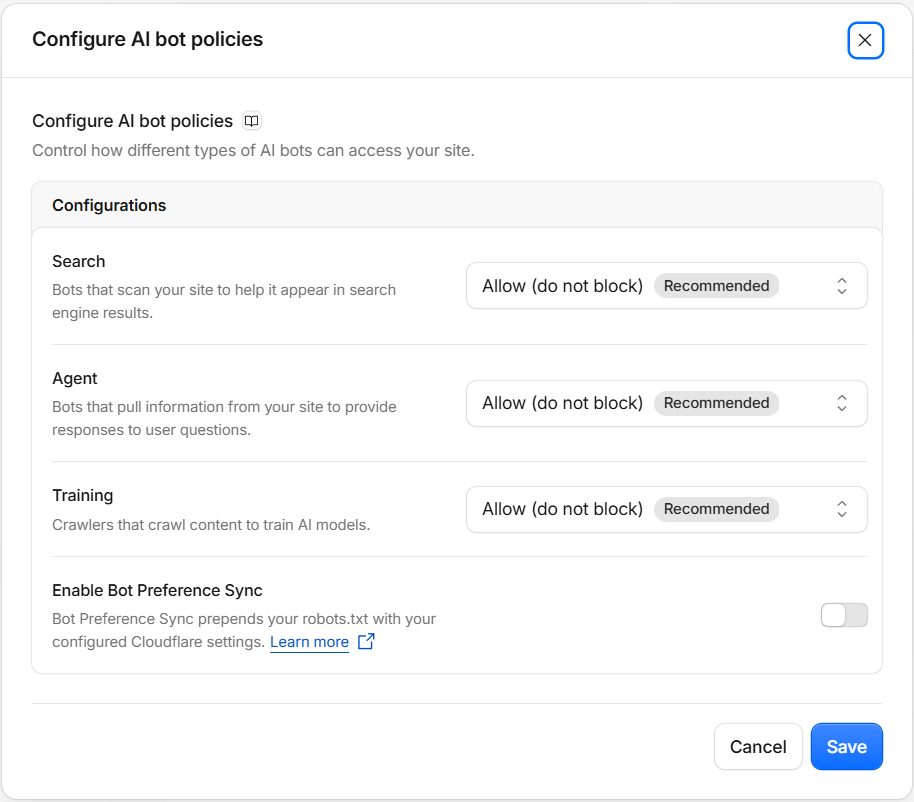
1. Allow Search and Agent access
In Cloudflare, open:
For a dealership that wants search engines and AI assistants to retrieve its public website content, the broad-access settings are:
Agent: Allow
Cloudflare uses Search for crawlers that build or support search indexes. It uses Agent for automated systems acting in real time on behalf of a user, such as an AI assistant retrieving information from a website.
For most dealer websites, blocking Search would work against the purpose of having the site publicly available. Blocking Agent can also prevent AI assistants from retrieving dealership information when a shopper asks them to do so.

2. Choose your Training policy
Training is a separate decision from search and AI visibility. Dealers have two reasonable choices depending on their goals and content-use policy.
Option A: Allow Training
Set:
This provides the broadest crawler access. Cloudflare does not add a Training restriction, although another security or WAF rule could still prevent access.
For dealerships that view their public website content primarily as information they want distributed as widely as possible, this may be the simplest configuration.
Option B: Disallow AI Training
Set:
This tells Cloudflare to apply its no-training policy while preserving search access for supported mixed-use crawlers.
Cloudflare says Applebot, Googlebot and Bingbot have its Accountable designation. Under Disallow AI Training, these crawlers can continue crawling for search rather than being blocked outright.
Cloudflare also blocks other crawlers classified for Training, including training-only crawlers where Cloudflare can distinguish them from search or user-directed crawlers.
Avoid confusing Disallow with Block
This is the most important distinction in the current Cloudflare setup. If you want to preserve search access, do not choose Block simply because you do not want AI training.
Cloudflare says Block applies to all crawlers in the Training category, including mixed-use crawlers. Selecting Block can therefore stop Googlebot, Applebot and Bingbot from reaching the site for search too.
Use Disallow AI Training when your intent is:
Use Block only when you actually want Cloudflare to prevent the crawler from reaching the site.
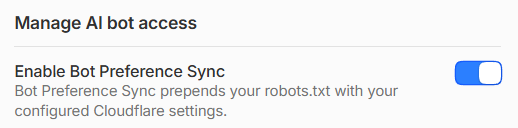
3. Turn on Bot Preference Sync
Cloudflare is replacing its older Managed robots.txt system with Bot Preference Sync. Bot Preference Sync keeps the site's robots.txt file aligned with the Search, Agent and Training policies selected in Cloudflare.
For example, if you choose:
- Search: Allow
- Agent: Allow
- Training: Disallow AI Training
Cloudflare can publish the appropriate no-training instructions in robots.txt without forcing you to maintain a separate list manually.
If the site already has its own robots.txt, Cloudflare says the Bot Preference Sync content is prepended to that existing file rather than replacing the site's existing directives.
Bot Preference Sync reflects Cloudflare's category-wide Search, Agent and Training policies. It does not automatically reproduce every custom per-crawler rule or exception, so sites with more complex bot policies should review the final robots.txt file with their website provider.
For most dealers using Cloudflare's category-wide crawler policies, enabling:
is the simplest way to keep the published crawler preferences aligned with the Cloudflare configuration.
Still check the actual robots.txt file
Bot Preference Sync does not mean you can ignore robots.txt.
After making changes, open:
Look for rules added by the website platform, CMS, vendor or another system that could conflict with the intended crawler policy.
Cloudflare notes that existing Disallow directives are preserved when Bot Preference Sync adds its own instructions. So a separate rule can still block something you intended to allow.
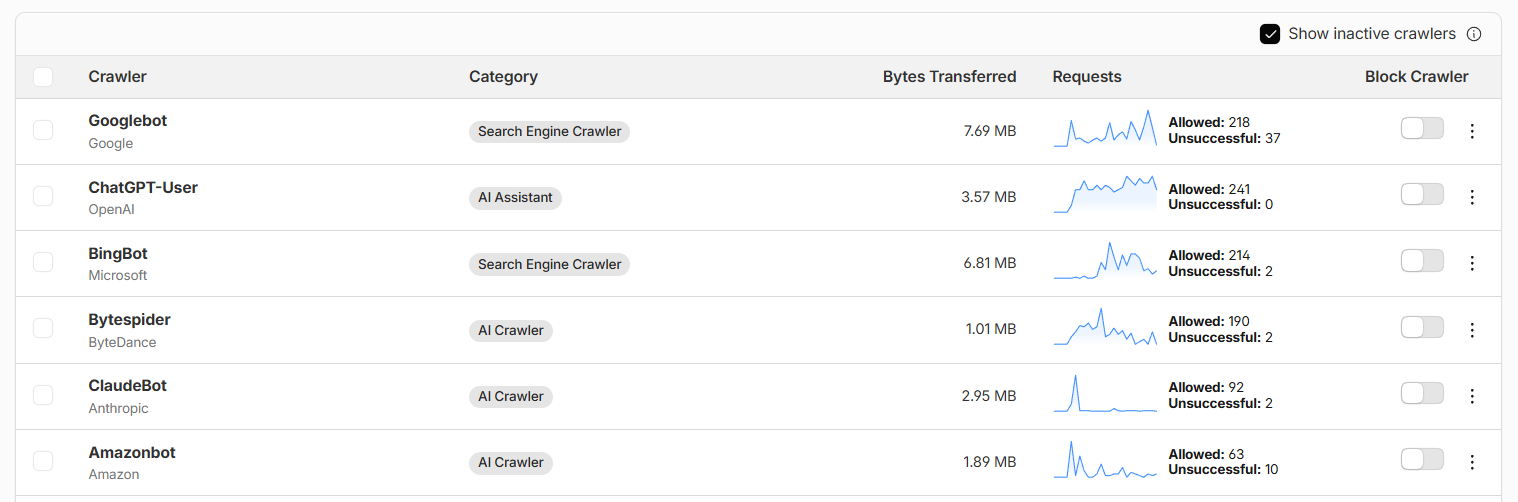
4. Check individual crawlers in AI Crawl Control
Cloudflare also lets you review individual crawler activity.
Open:
Look at the Block Crawler setting for crawlers you want accessing the dealership website. For desired search and AI crawlers, the Block Crawler switch should be off.
Pay particular attention to crawlers related to:
- Bing
- ChatGPT
- Claude
- Perplexity
- Apple
This is useful because category-level policies are only one layer of Cloudflare's bot controls.
A note about Bingbot
There is one current limitation worth knowing. Cloudflare says Microsoft is working on domain-level support for communicating a no-training preference through robots.txt, with support targeted for early 2027.
Until then, choosing Disallow AI Training does not automatically communicate that preference to Bing through robots.txt. Microsoft currently provides other controls, including its NOARCHIVE directive.
Importantly, Cloudflare says Bingbot can still continue crawling for search under Disallow AI Training.
For most dealer website teams, this does not require a separate change unless the dealership specifically wants to opt out of Microsoft's AI training.
What happened to the old Block AI Bots setting?
Cloudflare has deprecated the older Block AI Bots control in favor of the more specific Search, Agent and Training settings.
Cloudflare says most existing sites do not need to take an immediate migration action because their prior settings are being carried over automatically. Website teams should still check the resulting configuration rather than assume it matches their intended policy.
Sites that previously had the legacy Block AI Bots setting enabled are generally being migrated to:
- Search: Allow
- Training: Disallow AI Training
- Agent: Block on pages with ads
Sites that had the legacy setting disabled are generally being migrated to Allow for all three categories.
For sites that had already configured the newer granular controls, Cloudflare says previous Training settings of Block or Block on pages with ads are being migrated to Disallow AI Training.
That makes it worth opening Cloudflare and verifying what the site now shows.
Do not stop with the AI crawler settings
A crawler can still be blocked somewhere else in Cloudflare. After reviewing Search, Agent, Training and Bot Preference Sync, also check:
- WAF and custom security rules: Look for broad bot blocks or challenges that could catch legitimate crawlers.
- Bot Fight Mode or Super Bot Fight Mode: Make sure verified crawlers you want are not being blocked elsewhere.
- AI Crawl Control: Review unsuccessful crawler requests.
- Your own robots.txt: Confirm that your CMS or website provider has not added conflicting rules.
An Allow AI policy means Cloudflare is not adding that particular blocking policy. Another WAF or security rule can still block the request.
5. Verify crawler and Google AI access
Do not assume the configuration works just because the Cloudflare dashboard looks correct. After making any approved changes:
- Open Google Search Console.
- Use URL Inspection on the dealership homepage.
- Select Test Live URL.
- Repeat the test for representative inventory, service and local-content pages.
- Check Cloudflare for failed or blocked requests from legitimate crawlers.
Useful pages to test include:
- homepage
- new and used inventory
- individual vehicle pages
- service pages
- location and hours
- important model pages
- local buying or ownership content
The result that matters is simple: the crawlers you want should actually be able to reach the public pages you want them to understand.
Also check Google's Search generative AI setting
Google now has a separate control in Search Console for whether a site can appear in AI Overviews, AI Mode and generative AI features in Discover.
Go to:
If you want the dealership eligible to appear in Google's generative AI search features, confirm that:
is selected.
This setting is separate from AI training. Google's Search generative AI setting controls participation in generative search experiences, while Google uses separate controls such as Google-Extended for AI training-related preferences.
The bottom line
Search and AI visibility do not require you to allow AI training.
For dealers, the main Training decision is whether to use Allow or Disallow AI Training. Keep Search and Agent access available if you want search engines and AI assistants to retrieve the dealership's public website content.
Do not use Block as a substitute for Disallow AI Training. Block can also stop mixed-use crawlers such as Googlebot from reaching the site for search.
After making any changes, verify the result in Google Search Console and Cloudflare rather than relying only on the dashboard settings.
See what AI says about your dealership
CarGenius Dealer AI Visibility Reports measure which dealerships AI assistants actually name when shoppers ask non-branded Find, Buy, and Service questions, which competitors win those recommendations, and which sources are shaping the answers. See where your store stands.
View the Visibility ReportsGet a Custom ReportOr book a demo →Sources
- Cloudflare: Have it both ways: stay discoverable in search while disallowing AI training
- Cloudflare: Say it once: introducing Bot Preference Sync
- Cloudflare developer documentation / Bot Management API
- Google Search Central: technical requirements
- OpenAI publisher and developer crawler guidance
- Google Search Console Help: Search generative AI control
Is AI Visibility Worth Investing In? We're Measuring the Wrong Thing.
New research suggests AI drives little website traffic, but is that the right way to measure its impact? We explore how AI is changing automotive shopping, why traditional attribution misses its influence, and what dealers should do to prepare for agentic commerce.

Meta Muse: From AI that answers to AI that acts
Meta's new personal AI agent, Muse, takes on tasks instead of answering questions. We gave it a dealership MCP server: it searched live inventory and submitted a lead. What that means for dealers when the next shopper is an agent.
of car shoppers now start with AI
higher conversion with AI search
instant answers for every shopper
Stay ahead of the curve
Get weekly insights on AI, automotive commerce, and dealer tech delivered to your inbox.